
You will have received an email entitled 'Important: Your access to training'
If you cannot find it, then you can request it again here.
Don't forget to check spam!
You can always access the Fitfish for a Fiver website via the main Fitfish website
www.fit-fish.co.uk
The 'Courses Login' tab is in the main menu.

For iPhone (Safari browser)
Open Safari (this is important — it won’t work the same in Chrome)
Go to your Fitfish For a Fiver portal login page (you can access this via this link if you've lost it: https://www.info-fit-fish.co.uk/school)
Log in as normal
Tap the Share icon (the square with an arrow pointing up at the bottom of your screen)
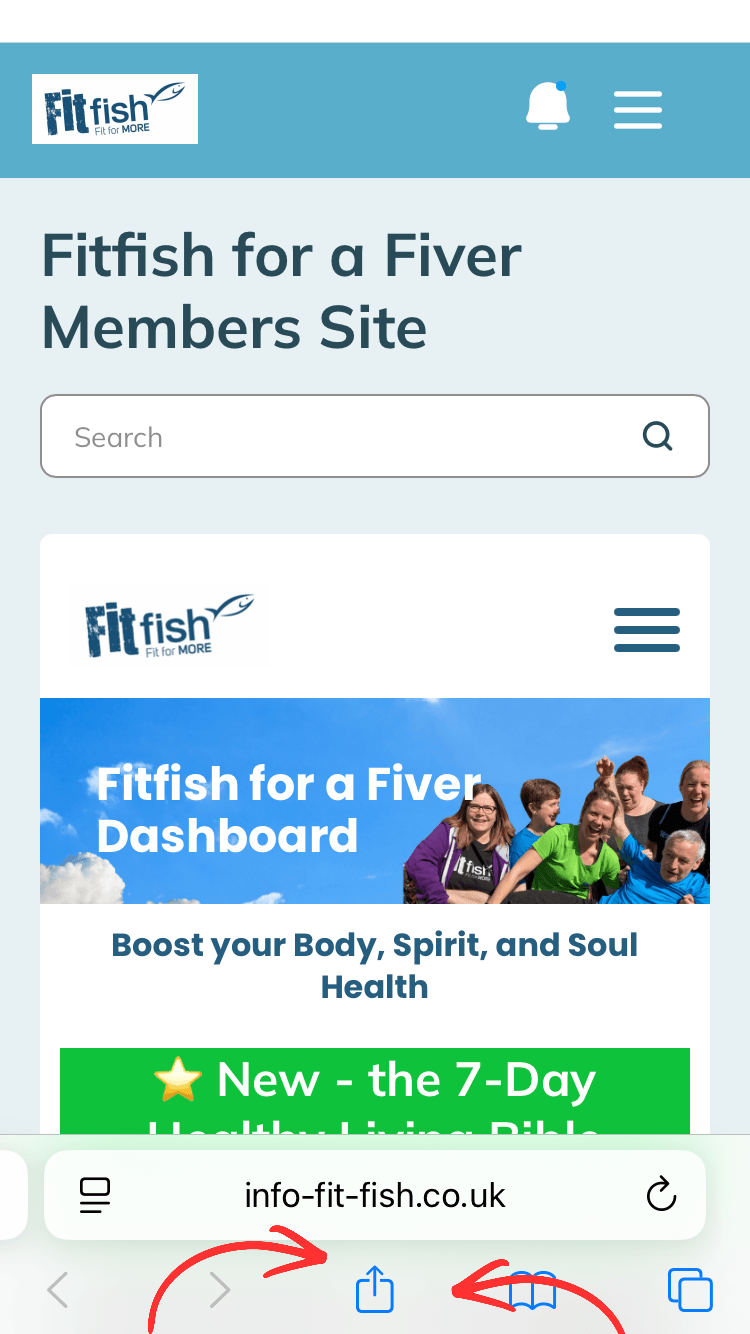
Scroll down and tap “Add to Home Screen”
You can rename it to “Fitfish” if you like
Tap Add
✨ That’s it! You’ll now have a Fitfish icon on your home screen — just tap it like an app anytime.
For Android (Chrome browser)
Open Chrome
Go to your Fitfish for a Fiver portal login page (you can access this via this link if you've lost it: https://www.info-fit-fish.co.uk/school)
Log in as normal
Tap the 3 dots (menu) in the top right corner
Tap “Add to Home screen”
Confirm by tapping Add
✨ That’s it! You’ll now have a Fitfish icon on your home screen — just tap it like an app anytime.
Yes, you can cancel at any time.
See below for how to cancel. ⬇️
Thank you so much for your support of Fitfish and me through Fitfish for a Fiver - it means a great deal!
By being a Fitfish for a Fiver member, you’re not only investing in your health and well-being, but also supporting a small Christian business that helps others do the same for less than the price of a drink and snack each month!
If you decide that Fitfish for a Fiver isn’t the right fit for you and you’d like to cancel - meaning you’ll no longer receive recipes, workouts, Bible reflections, monthly surprises, or access to the Fitfish Food Assistant - you can do so at any time.
Simply head to ‘Settings’ in your member portal and select ‘Manage my Subscriptions’ to cancel.
You’ll keep full access until the end of your current billing period (right up until your next payment date).
Thank you again for being part of the Fitfish journey!

Christian Health,
Christian Fitness and Christian Wellness
Supporting Christians in body, spirit, and soul.
Receive our weekly Friday email
Fit Fish Holidays Ltd